XT Exchange Provider
Run your platform's whole spot desk off your own XT account — one licence, one switch, one credential pair.
- Your XT account backs every spot market, ticker, candle and fill
- Two variables in .env — a key and a secret; XT needs no passphrase
- Tickers arrive as a push stream, so the market list moves without a refresh
- Maker and taker are yours per market: taker on buys, maker on sells
- Every imported market arrives switched off — nothing lists until you say so
- Open orders reconcile against XT every 60 seconds and release their holds
- Deposit addresses are your XT addresses, per currency and per network
- Chain minimum, maximum and precision read live from XT on every payout
- Every XT call is pinned to IPv4, because XT's key allowlist takes no IPv6
- HTTP, HTTPS, SOCKS4 and SOCKS5 proxy, with a test that never touches live
- Five finance screens: provider, markets, balance, fees and the candle cache
- Spot Orders carries XT's own order id, so your book reconciles against theirs
Inside the XT provider
Your XT account, running your spot desk
Every market, ticker, candle, order book and fill your customers see comes from XT, and every order they place is a real order on your account. No matching engine, no node, no private keys — an interface in front of a book that already has depth.
In detail
Every spot market, ticker, candle, order book and fill on your platform becomes a call to your own XT account. Customers get real markets and real depth on day one; you run no matching engine, no blockchain node and hold no private keys. The connector already ships inside the core — what you buy is the licence that switches the XT row on, and the update channel behind it.
How it works
Two variables in `.env`, a key and a secret, and the platform builds one authenticated connection and reuses it for every price, order, deposit address and payout. XT needs no passphrase. Tickers arrive as a push stream rather than a poll, so the market list moves without a refresh. Open orders are reconciled against XT every 60 seconds, currency prices refresh every two minutes, pending spot deposits are worked every fifteen, and two more jobs converge dispatched withdrawals. Exactly one provider is ever active platform-wide: enabling XT switches the others off inside the same transaction.
What you configure
| Surface | What you set |
|---|---|
| Markets | which symbols list — every import arrives switched off |
| Fees | maker and taker per market: taker on buys, maker on sells |
| Networks | which chains a currency accepts, read live from XT |
| Payouts | auto-approve, or hold every request for a decision |
| Access | proxy URL and its test, IPv4 allowlist, candle cache and retention |
What operators control
Five finance screens: the provider hub with live credential verification, the markets table, your XT account balance split into available and in-order, collected fees ranked by currency, and the candle cache. Spot Orders carries XT's own order id on every row, so your book reconciles line by line against theirs — with average fill price, a fills table and the settlement record behind each one. Stale open orders and a rising reject rate are on the same screen, because they are the first sign the connection is degrading.
Requires the Bicrypto core. Two things to settle before you launch. XT geo-blocks a list of jurisdictions and it is your **server's** location that decides, not your customers' — check yours before you buy, or budget for a proxy. And the admin Approve button has no XT branch: it refunds the customer and reports a failure, so spot payouts either run with auto-approve on or go out of XT by hand and get rejected here with a reason.
Two credentials and an address XT can see
XT takes a key and a secret and nothing else — there is no passphrase, and the variable for one is read and discarded. The other half of the door is the network: the platform pins every XT call to IPv4 on purpose, because XT's API-key allowlist does not take an IPv6 address, and a dual-stack server that presents one is refused on every signed call with an error that reads exactly like a wrong secret. Verify Credentials round-trips the saved key against XT so you find that out before your customers do.
XT geo-blocks a list of jurisdictions and it is your server's location that decides, not your customers'. A per-provider proxy is supported — HTTP, HTTPS, SOCKS4 or SOCKS5, with a test button that never touches the live connection — but a proxy replaces the IPv4 pin, so allowlist the proxy's own IPv4 instead.
Money in is matched by transaction id, not watched on a chain
A customer picks a network, takes an address out of your XT account for that currency and chain, sends the coins, then pastes the transaction hash. Nothing here watches a blockchain: the platform asks XT what your account received and looks for that hash, which is also the deposit's own key, so the same one cannot be submitted twice. While the page is open it asks every 15 seconds for half an hour; after that a job re-checks every pending spot deposit every 15 minutes, seven days back, under the same key as the live check so the two can never credit twice. What reaches the SPOT wallet is what XT says arrived less any fee XT kept, and a deposit that nets nothing after that fee is marked FAILED rather than part-credited.
Nothing is credited without the hash. A customer who sends coins and never comes back to paste it leaves money sitting in your XT account with no row on your platform pointing at it, and you settle that one by hand. The networks offered are whatever XT reports as depositable for that currency when the page loads, so a chain XT turns off disappears from the list with no re-import — and appears again the same way.
Money out leaves your XT account, on the path that works
A customer picks a chain, pastes an address and submits; the platform reads the minimum, maximum and precision live from XT for that chain, sends the withdrawal, then re-reads it to pick up the real fee and status. XT's own vocabulary is mapped onto the platform's — eight XT statuses onto five of yours — so the queue shows PENDING, PROCESSING or COMPLETED rather than raw exchange strings, and a failure or cancellation returns the customer's balance.
The admin Approve button has no XT branch. It finds no withdrawal response, refunds the customer under an idempotency key, marks the row REJECTED and answers with a failure — a batch of forty approvals refunds forty customers. Spot payouts on XT run with auto-approve on, or go out of XT by hand and get rejected here with a reason. Decide that policy before you take a deposit.
One provider is active, and changing it is a migration
Binance, KuCoin and XT are three rows in one table and the platform reads exactly one. Enabling XT switches the others off inside the same transaction — and that is the entire handler. It does not touch your markets, your currencies, your open orders, the candle cache or the running connection, and both the web process and the cron worker hold their own cached connection until they are restarted.
On a fresh install this is a licence, two variables and a restart. On a live book it is a settlement plan: clear every open order, finish pending deposits, empty the withdrawal queue, re-import currencies and markets, and move the float between accounts yourself — no screen does that part.
- credentials, no passphrase
- 2
- chains mapped for deposits
- 14
- XT payout statuses mapped
- 8
- jobs keeping the desk in sync
- 5
Everything included
84 capabilities, in 6 areas
Every item below exists in the source you receive. Nothing here is a roadmap.
Connecting your XT account
The provider hub, the two secrets, and everything between your server and XT.
- Provider hub with Overview, Regions and Settings tabs
- Two credentials in .env — a key and a secret; XT needs no passphrase
- Verify Credentials: a live signed round-trip that loads markets, then reads your balance
- Six named failures — missing, rejected, blocked location, clock drift, throttled, insufficient key permissions
- Two automatic retries with a clock re-sync before a timestamp error is reported
- Licence activation by Envato purchase code and username, from the admin panel
- Activation from an Envato licence file dropped into the lic folder
- XT's restricted-region list rendered on the provider page
- Per-provider proxy — HTTP, HTTPS, SOCKS4 or SOCKS5, credentials allowed in the URL
- Test Proxy: a separate credential-less connection that never touches the live one
- Proxy URL masked whenever the row is read back over the admin API
- A saved proxy applies without a restart — it evicts the cached connection
- Every XT call pinned to IPv4, because XT's key allowlist takes no IPv6 address
- Background clock sync every five minutes, signing behind XT's clock on purpose
- Automatic fallback to a public connection, so charts and tickers survive a credential fault
- Rate-limit switch that parks every provider call until XT stops throttling
- One provider active platform-wide, enforced in the transaction that enables XT
Markets, currencies and fees
Turning XT's listings into the book you actually run.
- Spot currency import, preview first: creates, updates, deletes and the first 25 codes queued for removal
- Missing-currency report — what XT lists that your platform does not carry
- Market import, preview first, writing precision, order limits and XT's maker/taker rates
- Spot-only filter that keeps swap and perpetual symbols out of your market table
- Delisted markets still holding open orders kept back rather than deleted
- Retained order count reported before any market is removed
- Currencies you had enabled stay enabled across a re-import
- Per-market price and amount precision, minimum and maximum amount, price and cost limits
- Maker and taker rates set per market — taker on buys, maker on sells
- Enable or disable a market, one at a time or in bulk
- Enable or disable a spot currency, one at a time or in bulk
- Trending and hot flags per market
- Networks read live from XT rather than stored, so a chain XT adds needs no re-import
- XT currency normaliser of its own: string deposit and withdraw flags, no active flag, ticker matched on either field
The desk your customers trade on
Everything XT's data reaches on the customer side.
- Market list with search, six filters and four sort keys
- Trading terminal with resizable, collapsible panels
- Chart, order book, trade tape, market list and open-orders panel
- MARKET and LIMIT orders
- Time in force stored on each order exactly as XT reports it
- Tickers, candles, trades and the order book pushed over WebSocket
- 13 candle intervals, 1m through 1M
- Precision, minimum and maximum amount and cost checked before an order reaches XT
- Fee taken from your stored rate at order time, never XT's
- Customer cancel that releases the held balance
- Per-user watchlist across spot, ecosystem and futures markets
- User-scoped order stream that credits fills as they land
- Order history with average fill price, the fills table and the settlement record
- Binary options markets that take their price from the same connection
Deposits
Coins into your XT account, credited to the right customer.
- Deposit address per currency and network, fetched live from your XT account
- Address resolved through whichever of XT's three address calls it advertises, and validated before it reaches the customer
- 14 XT chain names resolved from 26 platform aliases
- Deposit keyed on the transaction id, so the same one cannot be submitted twice
- A verification schedule over WebSocket that asks XT every 15 seconds for half an hour
- SPOT wallet created on a customer's first deposit in a currency
- Network fee deducted on credit; a deposit that does not cover it is refused, not part-credited
- A currency mismatch voids the record rather than crediting the wrong wallet
- Cancel a pending deposit
- An expiry switch that times a deposit out when XT dates it outside the request window
- Spot deposits in the deposit log, with per-transaction detail
- Pending spot deposits worked through every 15 minutes
Withdrawals
The path out, and the machinery that stops it paying twice.
- Withdrawal to an external address, chain chosen by the customer
- Minimum, maximum and precision read live from XT for that chain
- Memo or destination tag passed through to XT when the form collects one
- Mandatory tag field for XRP, XLM, EOS, ATOM and HBAR, plus BNB on BEP2
- Eight XT statuses mapped onto the platform's five
- Fee re-read from XT after dispatch and written onto the transaction
- One setting decides whether the customer or you absorbs the network fee
- Balance unwound when XT reports a failure or a cancellation
- Withdrawal queue with approve, reject and a mandatory rejection reason
- Auto-approve as a single platform setting, off by default
- Crash recovery every five minutes for a row debited but never confirmed sent
- Dispatched withdrawals converged to XT's own status every 30 minutes
- Idempotency-keyed refunds, so a retried decision cannot pay twice
- A Super Admin notified by name when a row cannot be resolved automatically
- Exponential backoff from one hour to a 24-hour ceiling on an unresolvable row
The admin desk
What you open on a Tuesday afternoon.
- Spot Orders: every order the platform placed on XT, with the trader joined
- XT's own order id on every row, so your book reconciles against theirs line by line
- Ten analytics tiles, including stale open orders, reject/expire rate and unreconciled fills
- Fee revenue ranked by currency, and top symbols by settled notional
- Settled notional over the selected window as a time series
- Order dialog with average fill price, the fills table, the settlement record and the timeline
- Your XT account balance, filtered to assets with a free or held amount
- Collected order fees by currency
- Candle cache: build, gap-fix and clean, with retention, request pacing, intervals and auto-update
- Scheduled Tasks showing last run, last error and next run for every job
- 23 exchange and spot-currency permission keys, per screen and per action
- Order settlement against XT every 60 seconds, currency prices every two minutes
- Licence
- Provider licence, activated in the admin panel against your Envato purchase code. Product id 54510301.
- Requires
- Bicrypto core, licensed separately, and an XT account with API access. Nothing else — no Ecosystem, no ScyllaDB, no node, no blockchain addon.
- Runs on
- Your own server, inside the Bicrypto tree. The connector already ships in the core and XT is already a row in the exchange table; the licence is what lets you switch it on.
- Credentials
- Two environment variables, APP_XT_API_KEY and APP_XT_API_SECRET. APP_XT_API_PASSPHRASE is read by the shared loader and discarded — XT declares no passphrase.
- Processes
- None of its own. Five jobs run on the existing cron worker; the connection lives in the backend process, and each holds its own.
- Admin surface
- 7 screens — provider hub, markets, charts, balance, fees, spot currencies, spot orders — over 40 admin endpoints
- Customer surface
- 21 endpoints under /api/exchange, three of them WebSocket streams, plus the spot deposit and withdrawal routes
- Access control
- 23 exchange and spot-currency permission keys. Enabling a market is gated on edit.ecosystem.market, which is needed whether or not Ecosystem is installed.
- Scheduled jobs
- 5 — order settlement every 60s, currency prices every 2 min, withdrawal crash recovery every 5 min, pending deposits every 15 min, withdrawal convergence every 30 min
- Network
- Outbound HTTPS to XT's spot and user REST hosts and WSS to its stream host, from an IPv4 address on the key's allowlist. HTTP, HTTPS, SOCKS4 and SOCKS5 proxies are supported.
- Chains and intervals
- 14 XT network names the deposit verifier resolves, from 26 platform aliases. 13 candle intervals, 1m through 1M.
- Integrates with
- The core's spot wallets, orders, transactions, withdrawal queue, deposit log and cron worker; binary markets, which can take their price from this connection. Runs alongside Ecosystem — SPOT and ECO markets and balances never mix.
- Spot only
- The provider row is typed spot. No futures, no margin, no perpetuals — swap symbols are filtered out of the market import on purpose.
- One provider at a time
- Enabling XT sets every other exchange row inactive in the same transaction. There is no configuration in which Binance and XT both serve traffic.
- Switching provider is a migration
- Your currencies, markets, precisions and fees were imported from the venue you are leaving. Re-import both, clear every open order first, and move the float between accounts yourself — no screen does that part.
- The admin Approve button has no XT branch
- It finds no withdrawal response, refunds the customer under an idempotency key, marks the row REJECTED and answers with a failure. Spot payouts run with auto-approve on, or leave XT by hand.
- Credentials are read once per process
- An .env edit does nothing until the backend restarts, and there is no reload button. The backend and the cron worker each cache their own connection.
- Your server's location decides
- XT geo-blocks a list of jurisdictions and grades the server, not the customer. A blocked host is refused on every call. A proxy works, but it replaces the IPv4 pin — allowlist the proxy's own IPv4.
- Nothing in your data says a memo is required
- XT publishes no memo metadata, so the withdrawal form asks for a tag on a fixed list of assets. List a memo-requiring asset outside it and the field never appears.
- A throttling ban is invisible
- While the switch is set every spot path returns having done nothing, and all five jobs report green because they completed. Nothing in the admin panel shows it.
- The coins are XT's to hold
- A SPOT balance is a ledger row mirroring your XT account. If XT freezes the account the key belongs to, your customers' spot balances freeze with it and nothing here releases them.
- No row records which provider it came from
- Orders, wallets and transactions carry no provider column and no audit entry. After a switch, the only signal is the row's creation date against the date you changed.
Loved by customers
Reviews
No reviews yet. Own it? Share your experience.
Own this product? Sign in to leave a review.
Better together
Bundles containing this product
Get XT Exchange Provider for less as part of a bundle.

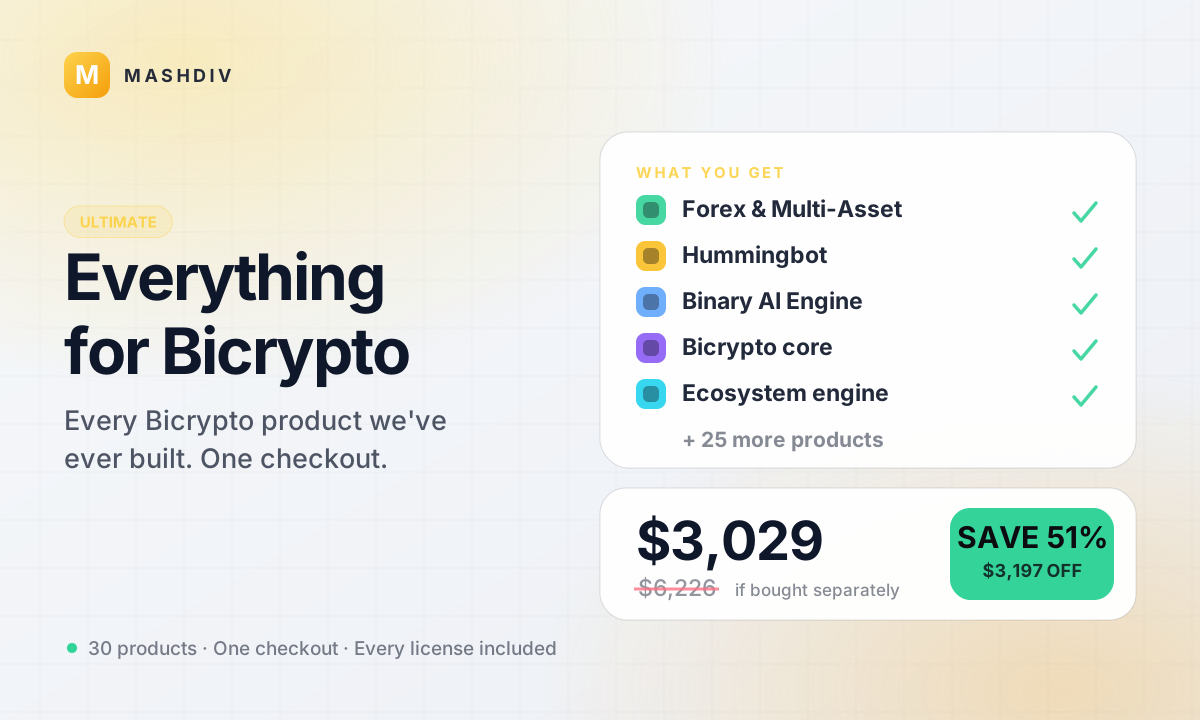 ULTIMATE
Everything for Bicrypto
Every Bicrypto product we make — every addon, every chain, both apps, one price.
- Forex & Multi-Asset Trading
- Web3 Wallet & On-Chain Trading
- Instant Convert
- Hummingbot Connector
- + 30 more
Keep exploring
Related products
 Provider
KuCoin Exchange Provider
Back your spot desk with your own KuCoin account: markets, balances, deposits and payouts, one connection.

 Provider
Binance Exchange Provider
Point the whole spot desk at your own Binance account — real books and real prices, with no node to run.

 Provider
Hummingbot Connector
Make your platform a venue Hummingbot can trade on — and keep the kill switch in your admin panel.